Advanced
Fine-tune how the Agent listens, understands, and responds during conversations. These options help improve accuracy, responsiveness, and overall interaction quality.
Automatic Turn Detection
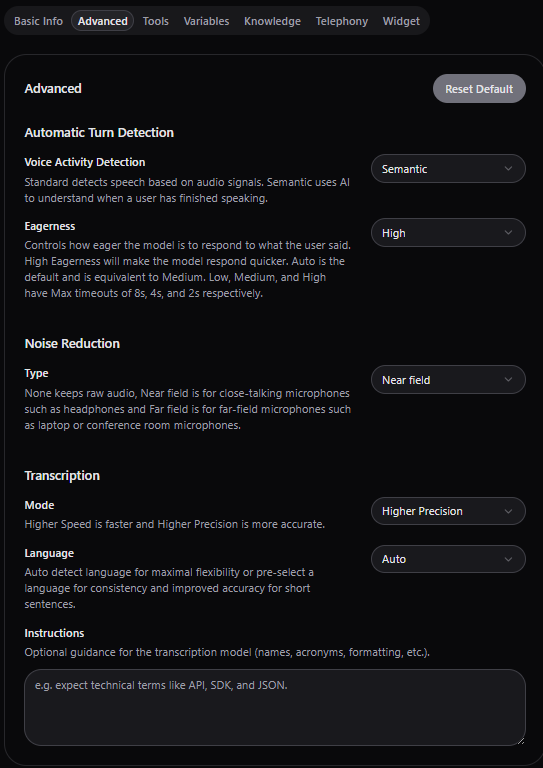
Controls how the Agent knows when a user has finished speaking and when it should respond.
Semantic
The Agent listens for meaning and intent, not just silence.
It continuously tries to understand if the user has finished speaking, even if the user pauses.
Example:
“I was wondering if you could help me book a demo… maybe tomorrow?”
👉 The agent waits for the full thought before responding.
Note that you can even control how eager is the Agent to respond.
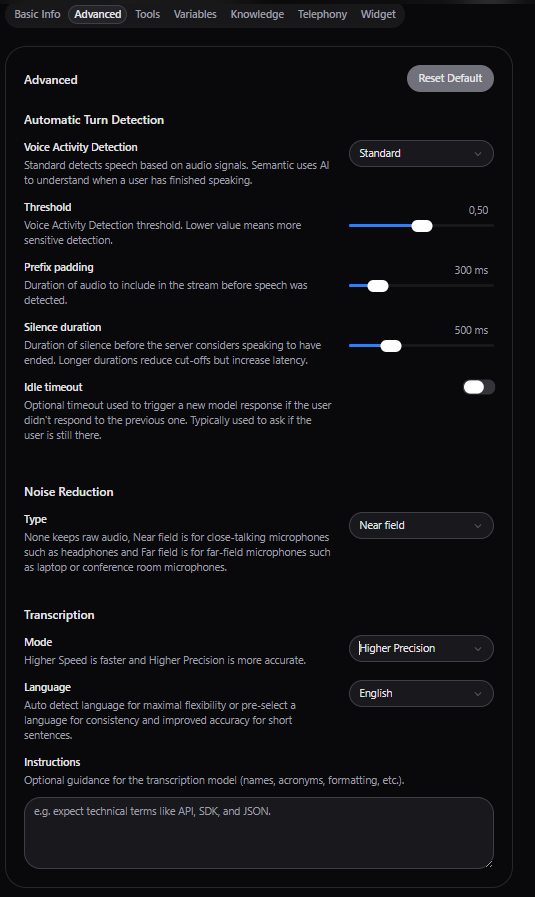
Standard (Timeout-Based)
The Agent responds after a pause or silence based on a fixed timeout (e.g., 1–2 seconds of no speech)
When to Use Each
- Semantic → More natural, human-like conversations (recommended)
- Standard → Simpler use cases or when timing must be strictly controlled
Noise Reduction
Improves how well the Agent hears the user by filtering background noise.
Near-Field
Designed for users speaking close to the microphone as phone calls, headset, laptop mic.
👉 Best for most use cases
Far-Field
Designed for users speaking from a distance as speakerphones, meeting rooms, kiosks.
👉 Helps capture speech in noisier environments
When to Use Each
- Near-field → One-on-one calls (default)
- Far-field → Shared spaces or noisy environments
Transcription
There settings control how the Agent converts speech into text.
Automatic Language Detection
The Agent automatically detects the spoken language out of 50+ supported.
This is best when the users are expected to speak different languages, however it comes with a drawback in accuracy, especially with shorted sentences.
Preselected Language
You define a specific language (e.g., English) which improves accuracy even for shorter sentences.
Note that you can even choose from high precision or high accuracy
Additional Instructions
You can provide extra guidance to improve transcription accuracy.
Examples
- “Expect email addresses and phone numbers”
- “Support technical terms and abbreviations”
Why This Matters
Better transcription leads to more accurate understanding, better tool usage and more natural responses.
Basic Setup
Build your MimerAI Agent in minutes. Instruct it for desired outcome, define its personality & voice. Then, immediately start talking to it! This is where the real magic happens — all in plain language, with zero lines of code.
Tools
Allow the Agent to take actions, not simply respond to questions.