Telephony
Never again miss a call, put a customer on hold or make them go though the pain of IVR - your Agent takes care of that. Serve every customer as & when best works for them. An experiance they will remember!
How does an Agent start answering calls?
That happens by assigning a phone number to an Agent. MimerAI takes care of the rest!
- Navigate to your Agent
- From the Agents tab on the lefthand side, navigate to the Agent, click Edit Agent
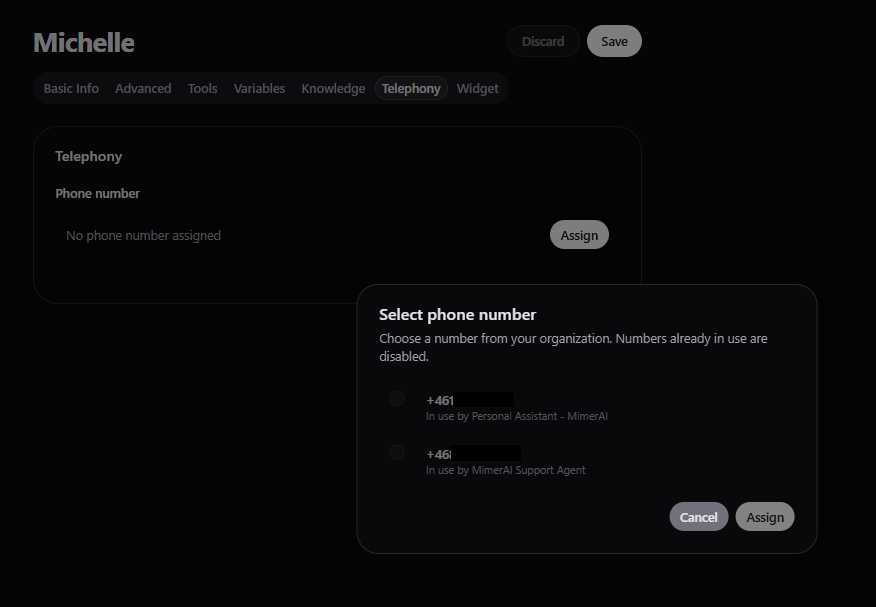
- Go to Telephony tab, click Assign
- You’ll see this option in the agent settings.
- Choose a number
- Select a number from the list.
- Click Assign
- That’s it! The number is now linked to your Agent.
- Test it out!
- Call the number from your phone and talk to your Agent!
Remeber
To unlink an Agent from an assigned number, navigate to the Agent’s Telephony tab, click Unassign.
How to enable Call Transfers?
In situations when the Agent can’t or it is preferred not to continue assisting, it should simply pass the call to:
- A human Agent (someone on your team), or
- Another special AI Agent trained for one job (like billing, IT support, legal etc)
We explain how to set that up clearly and safely, so the Agent knows when and how to pass the call.
Simple Example Let’s say you are building a Receptionist Agent. In situation when a caller asks for refund you want it to be directly transferred to a Customer Support Assistant, either AI or a human.
How to Set It Up?
You don’t need to write code — just tell the Agent exactly what to do within its Instructions on Basic Info tab. You need to address the following:
- When should the Agent transfer the call
- Provide the numbers of the Agents, either human of AI, the transfer is possible to
- How to make the transfer
Receptionist Agent
If you are asked about refunds or billing, and ONLY then, transfer the call to the Customer Support Assistant at +46xxxxxxxxx. Before even making the transfer clearly say you are gong to transfer the call.
Customer Support Agent
If someone wants to talk to a person, or their problem is too complex for you to solve after you have tried a few times, transfer them to a human Support Agent at +46xxxxxxxxx. Before even making the transfer clearly say you are gong to transfer the call.
Allow the transfer
To actually give the Agent the permission to transfer the calls as you have instructed, you need to allow it on the Telephony tab.
That’s It!
When should you to transfer the call?
It depends on your specific case. These are some hints when to consider transfering the call:
- The person specifically asks to talk to a human Agent
- The request is regarding something the Agent doesn’t handle
- The request needs a different AI Agent that’s better trained for the job
Additional Knowledge
This is the place for your Agent to get specific knowledge about your business, including details about your products, services and more. Everything a human Agent would know and beyond.
Widget
You can easily tailor the widget to your own look & feel. Keep it perfectly aligned with your brand & communication style.